Monday, December 23, 2013

Checking in the same change on multiple remote branches

We have a situation where we need to commit the same change on multiple remote branches. Of course, the painful way is to create so many clones and then manage them individually in terms of directories.

But with git there is a better way -- managing with remotes. See http://git-scm.com/book/ch2-5.html for an introduction on working with remotes.

To achieve this, setup as many local tracking branches as the number of remote repositories that you want to checkin into:

$ git branch <lb1> <rb1>

Here lb1 and rb1 are local and remote branches. In practice, lb1 can be any name that can be easily memorised and rb1 can be "origin/". Of course origin is a reference depending on the protocol chosen for sharing the remote.

Now, you can just cherry-pick a change from one branch and commit it on a different branch - like so...


$ git branch
$ git checkout lb1 # changes are checked in already on lb1
$ git log --oneline


Now pick up the SHA corresponding to your checkin and continue ...


$ git fetch # just to make sure that you are on HEAD
$ git checkout lb2
$ git cherry-pick --no-commit SHA # SHA is the value copied from lb1


Now check and confirm that all your changes are in order. Finally commit and push ...

$ git commit
$ git push origin HEAD:refs/for/<branch name>


Monday, June 11, 2012

Under House Arrest at Prestige Montecarlo

The residents of Prestige Montecarlo woke up to a reality that I am sure many didn't anticipate - of being under house arrest. The local folks - perhaps being instigated by the local politicians - are agitating and have blocked all entrance and exists from the apartment complex.
All the people, office goers, school goers and even some flight crew are being blocked from going out of the apartment complex and daily lives of all of us is disrupted.
The following is a brief history that culminates to the situation today (Jun 11, 2012) :
  1. Some unidentified people broke down the boundary wall adjoining the ananthapur road - ostensibly for road widening.
  2. The residents went to court to protect the property.
  3. The court has - in the last few days - given an interim order asking the locals to follow the due process of law to acquire land for road widening process.

Hopefully some sense would prevail...


Update (12:30pm): Some sense did prevail. Completely unknown to us, the protesters left the scene together with police (yep! the police was there all along). We don't know what made them leave, and whether they would come back tomorrow morning once again.

Wednesday, November 23, 2011

Writing Hindi for Internet / Emails

Writing in Hindi for internet consumption has been very painful -- so much that Hindi speakers/ writers have been left far behind in adopting internet as a medium of communication.

Most of these writers are comfortable typing with the remington style keyboard. This style of typing was adopted by the Kruti Dev and Devlys fonts. But these fonts are basically modified glyphs - which render properly on printed medium. They provide a key-mapping of hindi glyphs over the english keyboard.


E.g. when you type 'f' on your english keyboard, the matra '' is rendered pictorially, and when you type 'o' the consonant 'व' is rendered pictorially. If both these keys are pressed one after the other - fo - वि gets displayed. But note that this is all pictorial representation. This works because you have the font installed locally. 

However, as many of the hindi typists found out, the problem comes if you want to send the text that you have written using one of these fonts over internet. At that time the messages show the underlying english text and becomes meaningless. I.e. if you wanted to send 'विच्छिन्न' what gets sent is fofPNUu since that's the key-sequence that needs to be typed on an english keyboard using one of those fonts.

The solution to the above problem is to use characters in the unicode range 0x0900-0x097F which are the world-wide standards for displaying hindi characters. 

But just using the corresponding characters does not solve the problem. If we were to do that with 'विच्छिन्न' and just put the corresponding unicode characters in sequence we would get . It turns out that in addition to the character representation in the unicode range, the unicode consortium also prescribed a particular sequence for character composition. I.e. if one wants to get वि, one should type the unicode for व first and then the unicode  for  . This is different from what the typists are used to.
There are other such prescribed sequences - especially dealing with half-consonants. These half-consonants could be typed with a single key-stroke on hindi typewriters so they were atomic. But these are no longer atomic with unicode, instead one needs to compose these half-consonants with two unicode characters - one for the full consonant and a second character for the half-character marker (halant). Composing these half-consonants with is a sure recipe for problems since in such cases the unicode corresponding to must come 'between' the corresponding consonant and the unicode for halant. 

As a result of such mismatches, the hindi typists have had an uphill struggle while trying to communicate on internet. 

Now a bit of history on how the situation has come to this: historically the remington style mechanical typewriters were the first typewriter keyboard layout to become popular at a mass scale. Originally these were created for english with QWERTY as the keyboard layout. The idea behind the keyboard layout was to prevent the mechanical arms from jamming into each other when the typist pressed keys very quickly (and thus typing fast).

With time, the same idea was then adopted for hindi typewriters, resulting in the remington style typewriters.

When adopted to computers the english keyboard maintained its QWERTY layout because it was already in widespread use.

Similarly, when adopting a hindi keyboard layout for use with computers - the Kruti Dev style became very popular. It was already popular with the typewriter user community and it almost provided the same experience when performing offline word-processing tasks on computers.

On the other hand, the unicode committee for hindi provided its own recommendations on how the characters and words should be composed. These recommendations are at wide variance with the way the remington typewriters have been used for composing words in hindi.

To address the differences between the recommended unicode character and word composition methods and the methods used by the remington style typewriters, a few other keyboard layouts have been proposed. Inscript keyboard layout is the most notable of these since this is a *standard* keyboard layout being promoted by a few standards bodies in India.

But the inscript keyboard layout has not seen wide adoption since it alters the habits of the users already comfortable with a keyboard layout. It seems that touch typing is a hard skill to learn and once learnt, it is very hard to change.

Now - knowing that the remington style keyboard is the most popular keyboard layout we tried to solve all the problems associated with character sequence mismatches between the remington style keyboard layout and unicode standard. The tool provided at http://krutidevunicode.com works through all the known composition sequence mismatches between the remington style keyboard sequences and the way unicode standard expects them to be - and provides the users a seamless experience of typing -- as if they were typing on their own comfortable environment. 

Hope this proves to be a small step in helping Hindi become more popular on the internet.

[Note: At some places I have had to use the an images for 'chhoti-e' and incorrectly composed hindi words since the corresponding unicode sequences do not render correctly on the browser]

Sunday, May 16, 2010

Find As You Type in Google Chrome

Do you want Find As You Type feature in Chrome - just following this link and install the extension! Usage:

  • Start writing (or press /) to start text search.
  • Press ' to search only links.
  • Option "direct search state" set the default search policy (links, text or disabled).
  • Use (Shift+)F3 or (Shift+)Control+G or Alt+N/P to switch between matches.
  • Use F4 to toggle matching mode (text/links) once the search has started.
  • Blacklist support for sites that set up their own shortcuts (you can still search with / or ').
  • Search and select options in HTML selects (disabled by default).

Sunday, January 10, 2010

Debugging WSGI for deployment with Django on Apache2

WSGI by default blocks all writes to stdout/ stderr. While this is a good thing since it ensures that the django application can't interfere with the CGI in/out streams, it poses problem for debugging issues that may come up during deployment.

The method to debug such issues is to redirect the prints to stderr stream - which is captured in /var/log/apache2/error.log

    import sys
    print sys.stderr, ""


Tuesday, March 17, 2009

Blogging from emacs (followup)

After spending some more time with gblogger and trying to get things to work with Emacs/Zsh; I found e-blog through Xahlee's blog post.

I must say, I am pleased with the interface exposed by this package and the ease with which it installed and works - even for editing existing blog posts. Needless to say, I have switched to e-blog for posting entries to this blog.

Monday, March 16, 2009

Gblogger New Entry

Getting gblogger to work on zsh proved to be easy after a little bit of working knowledge of the gblogger code.

curl/ zsh appears to be stricter with URLs. So just changing URLs so that they are surrounded by single-quotes appears to have fixed this issue.

For this I needed to change gblogger code at two places:


g-auth.el:

(defvar g-auth-url-pattern
"'https://www.google.com/accounts/ClientLogin?service=%s'"
"URL to login to Google services.")


And,


gblogger.el:

(defun gblogger-new-entry (url)
"Create a new Blog post."
...
...
(setq gblogger-this-url (concat "'" url "'" ))
...
...
(substitute-command-keys "Use \\[gblogger-publish] to publish your edits ."))))


Notice the single-quote in both of these changes.

The change above is ofcourse not the final change - to make the code portable across all shells, this change should be made based on shell being used - but this gets us going in the right direction with gblogger/ Emacs on zsh.

Friday, March 13, 2009

Attempts to setup Blogger interface within Emacs


Recently I discovered TV Raman's gblogger interface for writing blogs on Google's Blogger service.

In the last few months, I have been trying to migrate my work-environment within Emacs so naturally I am very excited about this. But setting this up on my laptop proved difficult.

Firstly it appears that gblogger doesn't work with zsh. So I switched to using 'bash' just for this purpose (though hope is that I will be able to resolve this issue and switch back to zsh since that's my preferred shell.)

With this change I was able to get the ability to publish blogs. But editing existing blogs still does not work.

Some differences appear to have cropped up between the "edit interface" used by gblogger since the time it was released (two years ago).

To start with, I wasn't able to even correctly "fetch" an entry that I had posted earlier. To get around that it appears that the g-xsl-transform-region needs to be called "before" any html-unescaping is done on the *atom entry* buffer.

So I removed the call to g-html-unescape-region from -get-entry () function and moved to be after g-xsl-transform-region () call in -edit-entry ().

The above got me the entry in *atom entry* buffer. But a few html entities are still not getting escaped. These extra entities result in issues with publishing.

I will continue to investigate around this in my spare time - but just wanted to post this history for posterity.

Monday, September 29, 2008

Compaq V6000 and Wifi with Ubuntu

Although b43 worked out of the box on my Ubuntu 8.04 laptop for getting a Wifi connection up and running, I couldn't use it for a very long since connection with it kept getting dropped. Moreover, it connected with my linksys hub at a mere 2Mbps. So I had to resort to using ndiswrapper on my laptop. And it works great!

Here are the instructions how I got this to work. If you are starting out with a fresh install or don't have b43 or ndiswrapper installed, you can straight jump to section B.

A.a1. If you have enabled b43, disable this first by going into System -> Administration -> HardwareDrivers.

A.a2. Uninstall b43-fwcutter:


$ sudo apt-get remove b43-fwcutter


[You may want to restart your laptop at this point]
A.b1. Just to be sure remove any previous installations of ndiswrapper:


$ sudo modprobe -r ndiswrapper
$ sudo ndiswrapper -r bcmwl5
$ sudo rm -r /etc/ndiswrapper
$ sudo rm -r /etc/modprobe.d/ndiswrapper


[You may want to restart]
A.b2. Now remove the pre-canned version of ndiswrapper. We need to get the latest version of ndiswrapper.


$ sudo apt-get remove ndiswrapper-common
$ sudo apt-get remove ndiswrapper-utils-1.9


B.1. Now install ndiswrapper from source:


$ wget http://downloads.sourceforge.net/ndiswrapper/ndiswrapper-1.53.tar.gz
$ tar zxvf ndiswrapper-1.53.tar.gz
$ cd ndiswrapper-1.53
$ sudo make uninstall
$ sudo make install


B.2. Grab the Windows XP version of wifi driver. I got the URL for this from HP Support site - make sure that you use the correct driver otherwise the wifi will not work.


$ mkdir WLAN_DRIVER; cd WLAN_DRIVER
$ wget ftp://ftp.compaq.com/pub/softpaq/sp34001-34500/sp34152.exe
$ cabextract sp34152.exe


B.3. Ensure that b43 driver is not loaded.


$ echo 'blacklist b43' | sudo tee -a /etc/modprobe.d/blacklist


B.4. Install the WinXP driver with ndiswrapper


$ sudo ndiswrapper -i bcmwl5.inf
$ sudo depmod -a
$ sudo modprobe ndiswrapper
$ sudo ndiswrapper -m


B.5. Configure the network interfaces and ensure that ndiswrapper is auto-loaded and that WPA is configured for security.


$ sudo cp /etc/network/interfaces /etc/network/interfaces.orig # back up just in case
$ echo -e 'auto lo\niface lo inet loopback\n' | sudo tee /etc/network/interfaces
$ echo 'ndiswrapper' | sudo tee -a /etc/modules
$ echo 'ENABLED=0' | sudo tee -a /etc/default/wpasupplicant


B.6. Now create a shell script to ensure that the drivers are loaded in the correct order:


$ sudo vim /etc/init.d/wirelessfix.sh


B.7. This should open vim, press 'i' to go the edit mode of the editor and then paste the following lines


#!/bin/bash
modprobe -r b44
modprobe -r b43
modprobe -r b43legacy
modprobe -r ssb
modprobe -r ndiswrapper
modprobe ndiswrapper
modprobe b44


B.8. Save the file and close the editor by pressing the sequence [ESC] followed by ':wq' (without quotes)
B.9. Finally mark the script as executable and update the system to use this script at init time:


$ cd /etc/init.d/ && sudo chmod 755 wirelessfix.sh
$ sudo update-rc.d wirelessfix.sh defaults


Now, reboot. The laptop wifi should now work.

[ps: This description is based on http://ubuntuforums.org/showthread.php?t=781966]

Saturday, September 27, 2008

Hotmail and Firefox

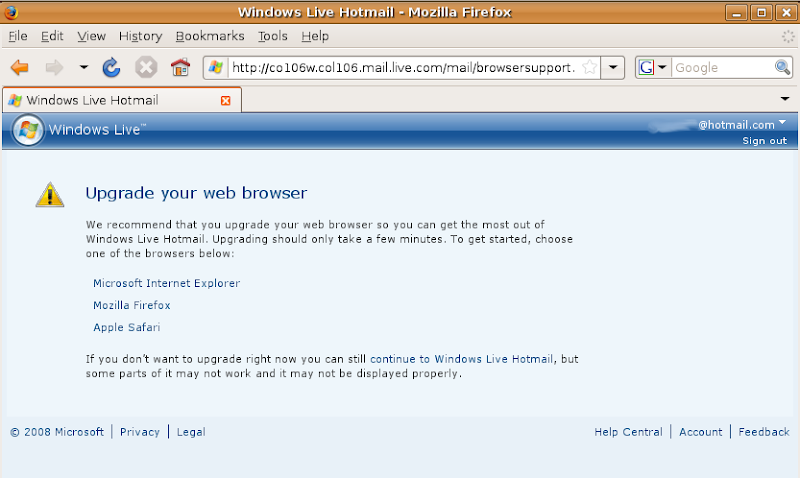
This is what I have started experiencing since upgrading Firefox to 3.x releases on my Linux box:


Not that I use Hotmail very regularly, but ever since upgrading to the later versions of Firefox - Microsoft Hotmail still wants me "upgrade to one of the supported versions" of my browser.

I wouldn't complain if this happened for the first few days after upgrading the browser, but I continue to face this 'helpful message' even months of the upgrade every time I try to log in to Hotmail.

Does Microsoft want me to stop using Hotmail as an email service provider completely??

Tuesday, August 5, 2008

Upgrading Ubuntu

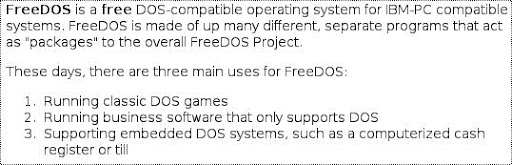
I have a Compaq Presario V6316TU notebook computer. It came with FreeDOS pre-installed but to me the OS was more to show that the computer booted up and had all the required hardware components in it. Here is what the FreeDOS project claims to be the purpose for the operating system:


As I mentioned earlier I finally installed Ubuntu 7.10 on this laptop. When Hardy Heron was announced, I decided to migrate to this version of the OS. I had a choice to make -- to upgrade from 7.10 or to do a clean install.

Some researching around suggested that I could get away with an upgrade since many people had experienced good success with the upgrade process (even though Ubuntu upgrades have been painful in the past).

The upgarde process was pretty simple since the Update Manager provided a very simple process to upgrade the distro -- just click a button :). On a 384Kbps connection the upgrade took about 10 hours but the laptop booted up properly after the upgrade. I was happy the wifi connectivity
continued to work through ndiswrapper even though there was an updated b43 driver that I could have used on my laptop.

Audio was the only sore point -- it was very noisy. I attributed it to some issues with updated driver and lived with it for a few days. There was hope that the Ubuntu folks would fix any issues in the next few updates and my issues would be fixed.

But this was not to be -- even after waiting for about 10 days (during which several updates were applied) the audio quality didn't improve. I wasn't getting time to get to the root cause of the audio problem, so I decided to do a clean install and see if that resolves the issue.

Aside from backing up my personal data -- the clean install process was quite smooth as well. And the audio quality was back to normal. Buh-bye to noisy audio... But then the wifi connectivity was hosed. This time around, I just enabled the b43 driver for this purpose and have been
happily using all the device capabilities of my laptop.

Experiences with Unix/ Linux distro

For most PC users who are aware of Linux, the default distribution appears to be Ubuntu now a days.

I switched to using Linux fulltime about 8 months ago - at office as well as at home. At office, my system had Red Hat Enterprise Linux 4.0 installed but for my home system (Compaq Presario V6316TU) I decided to go against the convention and try different things before finally settling on a distro.

As is well known, wifi support on Linux distros is a pain. This blog summarises my experiences in this regard with different distros.

Just to be clear, here is what the different commands say about the wifi chip on my laptop:

$ lspci | grep 4311
02:00.0 Network controller: Broadcom Corporation BCM94311MCG wlan mini-PCI (rev 01)

$ lspci -n | grep 4311
02:00.0 0280: 14e4:4311 (rev 01)


At first, I installed FreeBSD. It really brought back pleasant memories about my under-grad study where we had to use Solaris on Sun workstations. On my laptop I used it for about a week and tried to make it work with the devices on my laptop. As expected, Wifi didn't work but what surprised me was that the level of support from community was pathetic for the wifi chipset Finally, I had to switch to a more 'functional' distro since Wifi became more and more critical and lugging around the ethernet cable was proving to be a pain.

As a result I decided to switch to Fedora. I had worked with Red Hat Linux 9.0 distro earlier at work and had a good experience with it. So I downloaded the latest version of Fedora at the time - Fedora Core 7. It worked pretty well to start with. Wifi didn't work out of the box, but that was expected. 'ndiswrapper' was a known solution and I used to get my work done.

As time progressed, Fedora would announce daily updates. Initially, I was lucky and the updates only appeared to "improve" my system -- I didn't notice any ill effects. About a week later, Fedora announced a kernel upgrade. As a diligent user, I downloaded the upgrade over Wifi network. But after installing it, the wireless connection stopped working. I had to go through the rigmarole of removing ndiswrapper, installing it again to get the wireless networking to work again.

It was painful but I persisted with it for some more time since the next few updates didn't do any damage to wireless networking. And then, the whole thing happened again. I wondered -- how can someone be so "irresponsible" to hose their users. Perhaps wireless networking support is not a focus area for Fedora folks.

Thus I decided to ditch Fedora as well and tried a couple of other distributions before finally settling on Ubuntu.

The latest Ubuntu version when I moved was Gutsy Gibbon (v7.10). Although wireless again didn't work out of the box, ndiswrapper worked reliably. The updates also worked fairly smoothly and never hosed the wireless networking ability of my laptop. Currently I am on Ubuntu 8.04 LTS (Hardy Heron) and I no longer need to use ndiswrapper. Wireless also works out of the box (after enabling the 3P driver under "Hardware Drivers".

As a side note, although audio on my laptop worked with both FreeBSD and Fedora Core 7, the special audio control keys weren't recognized until I switched to Ubuntu.

Bangalore Traffic

You can't venture out on Bangalore roads without noticing the chaotic traffic. This holds true for all major and even minor roads. Often, there are circular dependencies created by mindless people driving their mindless vehicles. Auto-rickshaws, cars, trucks, tractors and cows ALL contribute equally. If someone wants to be a sane citizen on the road and not worsen the situation, there are enough vehicles piled up behind who honk continuously urging the "sane citizen" to be a part of the unending chain.

The administration often blames the ever increasing numbers of vehicles for this situation. To some extent and in some regions of the city, this might be true.

But this is backward thinking. No one can (and should) prevent people from being upward mobile -- upgrading from a 2-wheeler to a car. And then in a city where the public transport is hardly usable (except for a few volvos routes), the general public is left with no viable options.

And then, cities are supposed to help in increasing the standard of living of people and need to find ways to enable that. But the actions of administrators are contradictory more often than not.

A few examples --

1. There are many "constant choke points" on the outer ring road. But we don't have traffic signals.

2. At peak traffic times, traffic cops switch the control to manual mode and then they use volume to decide when to allow traffic from a certain direction. Usually, this results in people staying at the same position for a long time causing frustration and resulting in the commuters trying 'un-conventional' means of pushing ahead if they see an opportunity.

3. They put speed bumps on busy intersections. Ostensibly, these are put to enable pedestrians to cross the road but in reality these act as hindrance to these same pedestrians (yep - queue theory suggests the same thing about bursty traffic but who is going to teach the traffic cops queue theory).

4. The list is endless but I will end it with one other major pain -- the traffic cops have no authority. They are in NO POSITION to actually control the traffic. These souls don't carry any means to ENFORCE traffic rule - nope, not even a plain old wooden stick. So people are free to obey (or more often not obey) what that traffic cop on the other side of the road is suggesting by distantly waving hands.

Contrary to what they say/do, the city has enough roads and enough traffic capacity to provide a amicable commute environment for all. Based on my experiences in other cities in India and even outside India, I have been considering what simple things the city could do in the short term (while focusing on improving infrastructure for longer term):

Firstly, the traffic cop should be made more powerful. The poor soul should have atleast a stick which he can wield against people violating traffic rules. And he should be even authorized to bang it on vehicles and people if they are not obeying rules. There could be "banging guidelines" but I digress... Initially, this may lead to some chaotic scenes but once people realise that they no longer have the "free will" to drive carelessly, the situation would improve.

Secondly, heavy vehicle movement in the city needs to stopped during day time (7:00 am to 9:00 pm). These vehicles should be blocked outside the city. Outer ring road is within the city, not outside. So trucks should not be stopped on the outer ring road.

Thirdly, there should be traffic signals on ALL intersections and the time period of these signals should be programmable based on the time of day. At no time, the signal should be non-functional (since it causes confusion). All debates around utility of traffic signals should be dealt through working the time period at which the signal operates. There should be NO option to turn off the traffic signal and manage traffic manually (manual control should only be done when there is a power failure on the signal). Also, the time period on any signal should never be more than 2 mins (120 seconds). Human patience is a fragile thing and testing it beyond 2 mins results in unwanted behavior.

The above three suggestions should take care of atleast 75% of the traffic issues.

Ofcourse, there are other ideas that can be put to good use but they are more time taking and somewhat medium term and have a larger effort required to implement so I won't go into their detail in this post.